Weather Forecast, Live Radar
- 4.4
- Rating
- 10.00M
- Installs
- Free
- Price
 Analysis by App-foxy
Weather apps are easy to underestimate until one has to make a decision around changing conditions. I tested Weather Forecast, Live Radar as a practical daily tool rather than judging it only by its colorful forecast screens. My overall impression is that it is most convincing when I want a quick visual answer: Is rain approaching, how serious does the storm look, and should I change my plans? The combination of forecast information, widgets, storm radar, and hurricane tracking gives it a broader role than a simple temperature app.
Weather Forecast, Live Radar is a free weather app from Fillog Studio, available for users aged Everyone. It has built a sizable audience, with an average rating of 4.5 from around 103 thousand ratings and more than 10 million installs. Those figures do not automatically make it the right choice for everybody, but they do suggest that its straightforward presentation works for many people.
How the app feels in everyday use
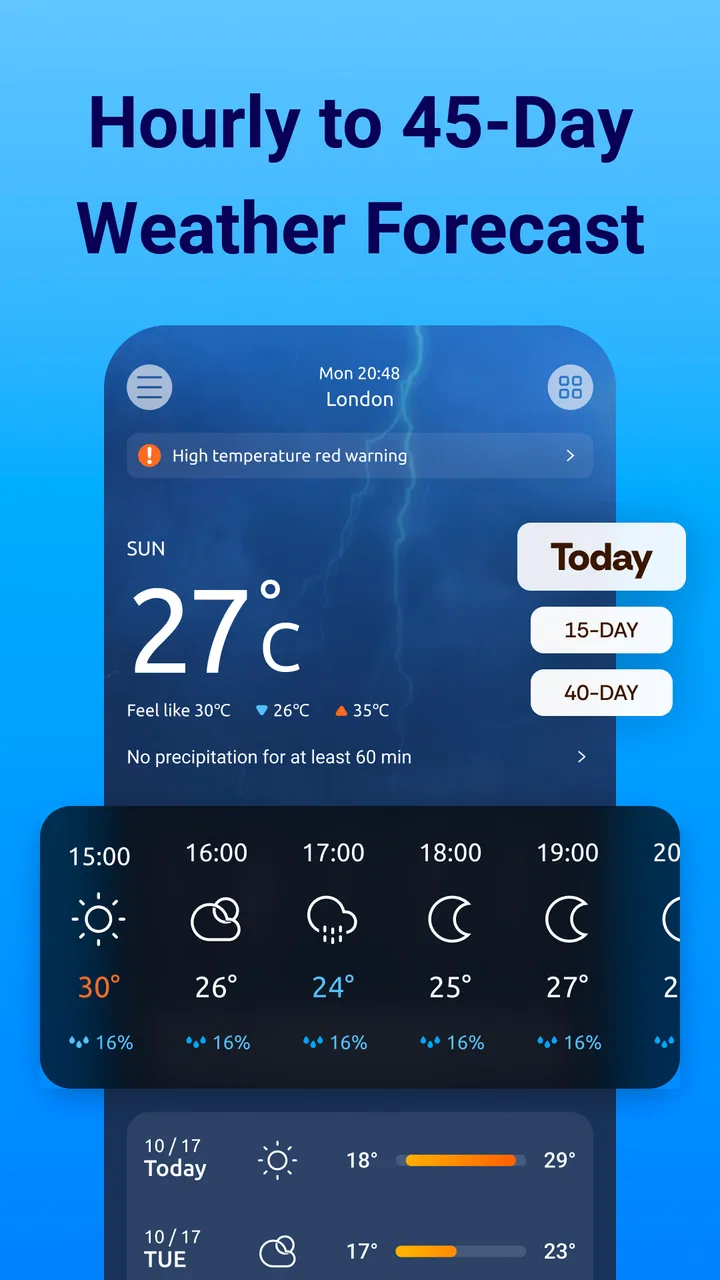
The first thing I noticed is that the app is designed around quick checking. Weather information is most useful when it helps me answer a small question without making me study a complicated dashboard. A glance at the current conditions can be enough before leaving home, while the hourly and longer-range views are more useful when I am planning a walk, commute, outdoor job, or weekend activity.
You May Also Like

 Pandora - Music & Podcasts
Pandora’s Music Is Easy to Start, but Harder to Recover
Pandora’s strength is its low-effort path from a seed to a station. Its weak spot is how much confidence it asks you to place in connection, setup, and quiet recovery.

 8 Ball Pool
 Is Built on Rivalries, Rematches, and Routine
A close look at the rivalries, rematches, shared routines, and unanswered safety questions that turn a quick pool match into a persistent mobile community.

 Samsung Music
’s Quiet Strength Is Playing What You Already Own
Its reach comes less from spectacle than from dependable access to a personal library. That simplicity is both the app’s strongest retention engine and its ceiling.

 AccuWeather: Weather Radar
AccuWeather Review: A Quick, Clear Forecast for Everyday Decisions
For everyday plans, the best forecast is the one you can understand quickly. AccuWeather makes rain timing, radar, and local conditions easy to act on, with a few trade-offs.

 Hill Climb Racing
Why Hill Climb Racing Still Turns Crashes Into One More Run
A tiny car, a bumpy hill and one more upgrade: Hill Climb Racing keeps resurfacing because its simple chaos makes every near-miss feel personal.

 AliExpress - Shopping App
AliExpress Makes Global Shopping Feel Personal, but Shoppers Bear the Risk
AliExpress turns a global marketplace into a pocket-sized discovery engine. Its reach is useful, its shopping loop compelling, and its trade-offs easy to miss.
More From Our News Desk
View All News


The radar view is the feature that gives the app its clearest identity. A standard forecast may tell me that rain is likely, but a live radar view helps put that possibility on a map. I can use it to see whether a weather system is moving toward my area, passing nearby, or breaking apart before it arrives. That distinction matters when I am deciding whether to leave immediately, wait a little, or carry on with the original plan.
I also found the visual approach more useful during unsettled weather than a list of percentages. When clouds and showers are moving across a region, a map can communicate the situation faster than several lines of text. This is especially helpful when I am already outside and need a quick decision, although I would still treat any forecast as guidance rather than a guarantee.
The widgets are another practical part of the experience. A widget can reduce the need to open the full app every time I want to check the temperature or general conditions. That is a small convenience, but it changes how often weather information becomes part of my routine. I can check before getting dressed, before taking a child or pet outside, or before starting a trip without interrupting whatever I am doing.
There is a useful trade-off here. A widget is excellent for awareness, but it is not a replacement for the radar screen when conditions are changing quickly. I would use the widget for the first glance and open the app for the second look if rain, wind, or storms could affect my plans. That two-step habit makes better use of what the app offers instead of expecting one small panel to show everything.
Radar is strongest when a decision is time-sensitive
The most convincing use case is a normal day that suddenly becomes uncertain. Imagine I am preparing to walk to a station and see dark clouds outside. Rather than relying only on a general forecast, I can open the radar and check whether the rain is a small patch nearby or part of a larger band moving across the area. If the movement suggests a short delay could help, I may wait. If the system is spreading, I know I should prepare for a longer interruption.
This is more useful than simply seeing a rain icon because it adds context. The map helps me think spatially: what is happening around me, where it is coming from, and whether my route is likely to be affected. I would not use it to make safety-critical decisions on its own, but for everyday planning it can be a meaningful improvement over checking a single forecast symbol.
A second worthwhile workflow is checking the radar before leaving work rather than after stepping outside. I can compare the current map with the near-term forecast and decide whether to take a jacket, change my route, or postpone an errand. The benefit is not that the app predicts every detail perfectly; it is that it gives me another layer of information before I commit to a plan.
Storm tracking also makes the app more useful during unsettled periods. Instead of opening a separate tool only when weather becomes dramatic, I can keep the same app for ordinary forecasts and more serious conditions. That continuity is convenient, particularly for someone who does not want multiple weather services competing for attention.
Widgets make the app easier to live with
Many weather apps are technically capable but require frequent opening to be useful. Weather Forecast, Live Radar takes a more practical route by offering several widget options. I like this because the home screen becomes a passive reminder rather than another destination I have to remember to visit.
My advice is to choose a widget based on the decision it needs to support. A compact option is better if I only want the current condition and temperature visible. A larger design makes more sense when I want a broader preview without opening the app. Filling the home screen with too much information can be counterproductive, so I would start small and expand only if the extra forecast detail genuinely saves time.
Widgets can also expose one of the app’s limitations: a glanceable display is necessarily selective. If I need to understand storm movement, I should not assume the widget will provide the same context as the full radar. The best setup is therefore not “install it and forget it,” but “use the widget for routine checks and the main app for interpretation.”
Where it fits beside familiar alternatives
Compared with a phone’s built-in weather panel, this app feels more focused on visual monitoring. A default weather screen is often enough for current temperature and a basic forecast, but it may not be the first place I look when I want to follow a storm system. The radar and hurricane-tracking emphasis gives this app a reason to exist beyond duplicating a basic system widget.
Compared with a dedicated radar service, however, the appeal is broader rather than necessarily deeper. Someone who spends a great deal of time analyzing storms may prefer a specialist tool built around highly detailed mapping and professional-style interpretation. This app is more approachable for the person who wants radar available alongside everyday forecasts, widgets, and broader weather information.
That difference is important. I would recommend it to someone who wants one convenient weather companion, not to someone who expects a specialist meteorological workstation. Its strength is the balance between ordinary daily checking and occasional serious weather awareness.
The main weakness is the gap between convenience and certainty
The biggest limitation is not a missing headline feature; it is the risk of treating visual information as more precise than it really is. A radar map can look authoritative, but it still requires interpretation. A colored area on the screen does not automatically tell me exactly when rain will reach my street, how heavy it will be at my location, or whether a short shower will affect my route.
I also found that the app’s range of information can encourage overchecking. When the forecast, widgets, radar, and storm tools are all available, it is tempting to keep refreshing instead of making a reasonable decision. For ordinary plans, I think the healthiest workflow is to check once before leaving and again only if the weather is visibly changing. No weather app can remove uncertainty entirely.
Another consideration is monetization. The app is free to install, but in-app purchases range from $1.99 to $19.99 per item. That does not make the free experience unsuitable, but it means users should pay attention to which optional elements they actually value. I would begin with the free version, establish whether the widgets and radar fit my routine, and only then consider spending money. The app is easier to recommend when its core usefulness already matches a person’s needs without assuming an upgrade.
There is also a practical question about attention. If I only want a minimal temperature reading and nothing else, the additional radar and tracking focus may feel unnecessary. A simpler built-in weather tool could be faster for that narrow purpose. This app earns its place when I use the extra context, not merely because it can display the current temperature.
Who should use it, and who should choose something else?
I think the best audience is anyone who regularly makes plans around changing weather but does not want a specialist forecasting service. Commuters, walkers, cyclists, parents arranging outdoor activities, travelers, and people who work outside can all benefit from having a radar view close at hand. The widgets are particularly useful for people who prefer information to appear on the home screen rather than requiring a separate search.
It is also a sensible choice for households that want a quick shared reference point. Before leaving for school, work, shopping, or an appointment, someone can check the widget and then open the radar if conditions look uncertain. That is a more useful routine than arguing from a vague “rain later” forecast.
I would be more cautious about recommending it to users who need highly specialized weather analysis or who make safety-critical decisions. In those situations, an official warning source or a dedicated professional service should take priority. The app can help with awareness, but I would not make it the only source for severe weather decisions.
Likewise, people who dislike visual dashboards, widgets, or optional purchase prompts may prefer a stripped-down weather app. Weather Forecast, Live Radar is at its best when its extra layers are welcome. If the goal is only to see today’s high and low, its broader design may be more than necessary.
Compatibility and long-term practicality
The app supports devices running Android 6.0 or later, which gives it a broad reach across older and newer Android phones. Its current version is 1.5.3, and the app has been available since October 28, 2022. For me, those details matter less than whether it remains comfortable to use on the phone I already have, but they do make it accessible to people who are not using a recent handset.
Because weather apps are checked repeatedly, small usability choices matter more than they would in an app opened once a month. The widget should be placed somewhere I naturally look, while the radar should remain easy to reach when conditions change. I would also avoid relying on a single glance during a storm; the map is most helpful when I take a moment to understand its movement and compare it with the broader forecast.
The age rating of Everyone also fits the app’s everyday purpose. It is the kind of tool a household can use for routine planning, although younger users should still understand that a forecast is not a substitute for adult judgment during dangerous weather.
My verdict after using it as a daily weather tool
My final view is that Weather Forecast, Live Radar succeeds by making weather feel more actionable. The widgets handle quick checks, while the radar and hurricane-tracking tools give me a better way to understand changing conditions than a basic temperature panel. The app is especially valuable when I need to decide whether to leave now, wait, change a route, or prepare for a storm.
It is not the right choice for everyone. Users who want only a bare forecast may find it broader than necessary, and people who require specialist-level certainty should look beyond a general consumer weather app. The optional purchases also deserve a deliberate approach rather than an automatic upgrade.
For my own use, I would keep it installed because it covers the gap between a simple built-in forecast and a dedicated radar service. I would place a modest widget on the home screen, use the main forecast for routine planning, and open the radar whenever the sky or the forecast becomes uncertain. If that sounds like the way you make weather decisions, this free app from Fillog Studio is worth trying.
FAQs for Weather Forecast, Live Radar
01What features does the Weather Forecast, Live Radar app offer?
The Weather Forecast, Live Radar app provides real-time weather updates, including temperature, humidity, and wind speed. It features an interactive live radar, detailed 7-day forecasts, severe weather alerts, and customizable notifications. Users can also check sunrise and sunset times and access weather maps for various locations worldwide.
02Is the app free to use, or does it require a subscription?
The app is free to download and offers basic weather updates at no cost. However, it includes premium features such as ad removal, extended forecasts, and enhanced radar capabilities. These features are accessible through a subscription plan, which can be paid monthly or annually, offering flexibility for different user needs.
03How accurate is the weather data provided by the app?
The app sources its data from reputable meteorological organizations and uses advanced algorithms to ensure accuracy. While no weather app can guarantee 100% precision, users generally find the app reliable for daily planning. Regular updates and real-time adjustments help maintain the accuracy of the forecasts.
04Does the app consume a lot of data or battery life?
The app is optimized for efficiency, but live radar and frequent updates can increase data usage and battery consumption. Users concerned about data usage can adjust update frequency in settings. Background data usage is minimized to preserve battery life, making it suitable for both casual and frequent use.
05Can the app send severe weather alerts?
Yes, the app provides customizable severe weather alerts to keep users informed about potential threats like storms or heavy rainfall. Alerts can be tailored based on location preferences, ensuring users receive timely notifications about weather conditions that may impact their travel or daily activities.
Pros
- Accurate real-time weather updates.
- User-friendly and intuitive interface.
- Customizable notifications for alerts.
- Detailed radar maps for tracking.
- Minimal ad interference during use.
Cons
- Limited free features without subscription.
- Occasional slow loading of radar maps.
- Battery consumption can be high.
- Some features require constant internet.
- Limited support for certain regions.

Weather Forecast, Live Radar
Gallery